CASE STUDY · A PRACTICE HONED ACROSS TEAMS
Project Zero: putting the answers next to the screens
How I document product flows so developers, QA, product and legal find their answers in the Figma file, instead of in another meeting. It's a discipline I've honed for years and adapted to every team I've worked with. In 2022 – 23 one team needed it written down, so I turned it into a method anyone could follow.
5 MIN READ
At a glance
- My role
- Lead designer. I set up the method and ran it with the team.
- When
- Honed for years across teams. Written down as a method in 2022 – 23.
- Team
- Designers, product managers, developers, QA and legal reviewers
- What I did
- One shared page of stable rules, notes beside the screens that break them, flows that show every result, and every state drawn
- Shown on
- A made-up room-booking app. The real work is under NDA, so the method is shown on a safe example.
- Next
- Test it with someone reading it cold
01 · THE PROBLEM
The same questions came back in every walkthrough.
Flow reviews answered a question once, out loud. A week later someone asked it again, because the answer lived in a call, not in the file. Developers, QA, product and legal each needed the same rules, at different times. I'd been putting answers in the file for years; as the team grew, that habit had to become something everyone could follow.
02 · CONSTRAINTS
In a regulated product, a guess can't ship.
Every state had to be right: what someone sees when a step fails, what has to be shown by law, and what isn't confirmed yet. Not everyone could sit in every walkthrough, and the file still had to make sense months later.
03 · WHAT I LOOKED AT
Most questions were about rules that never change.
When I sorted the repeated questions, most were about stable things: naming, components, how errors behave. Only a few were real exceptions. That split became the method.

04 · DECISION
Each answer sits next to the step it explains.
A note lives beside the one screen it changes. Nobody has to remember a meeting or search a separate document to find it.
05 · DECISION
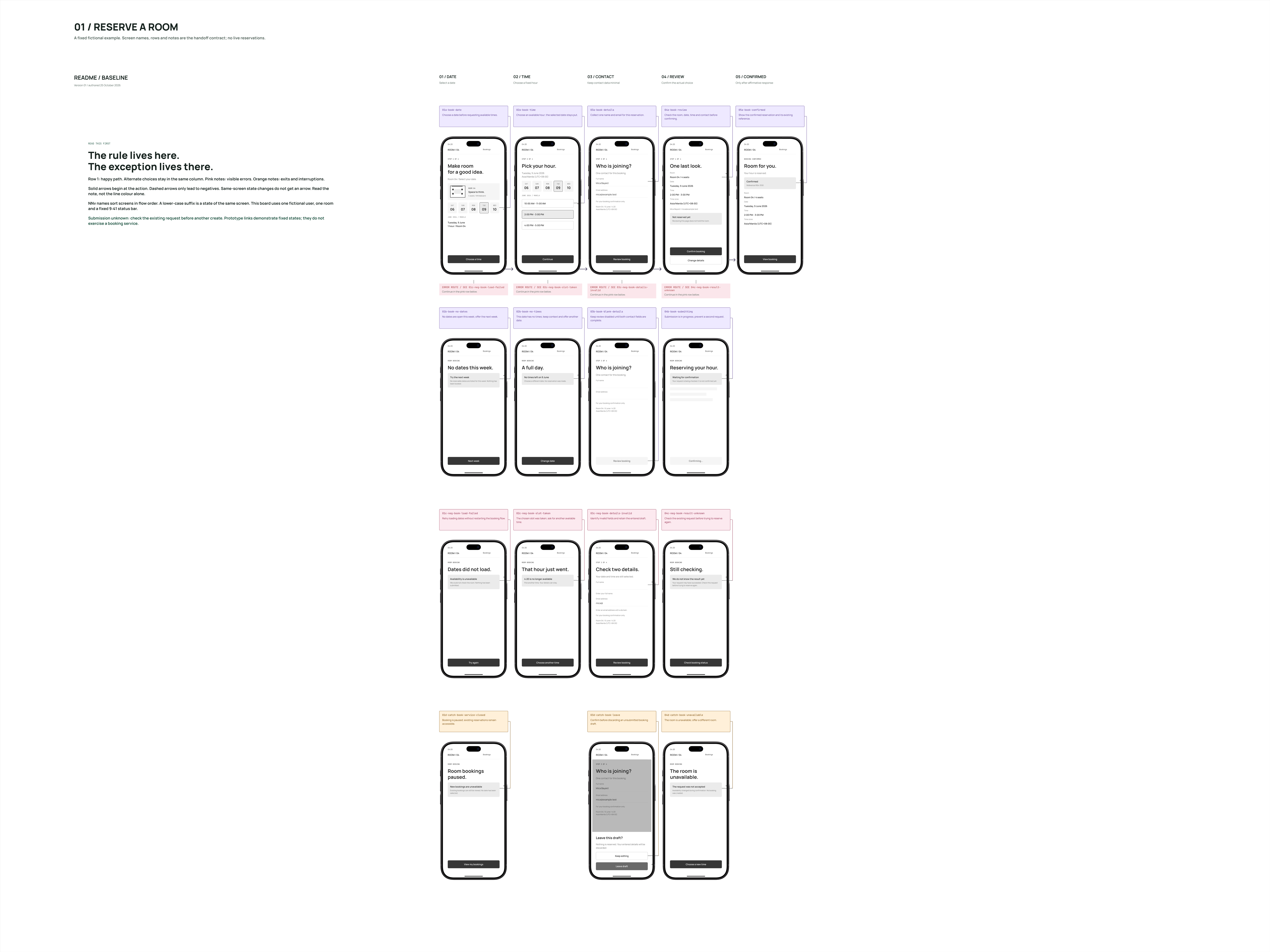
A sent request is never shown as a confirmed booking.
Every action in the flow points to the result people actually see. Confirming a room starts a request. A booking reference only appears once the booking is confirmed.
06 · DECISION
Every state is drawn, including "we don't know yet".
Review, submitting, confirmed, result unknown and slot unavailable each get their own screen. Each one says plainly what happened and what to do next, so nobody books the same room twice.
07 · THE HANDOFF
A developer can follow one booking from start to finish, without a meeting.
Read the shared rules, follow the action, check the outcome. If a result is unknown, the file says to go back to the same request instead of starting a new one.
08 · WHAT I'D DO NEXT
Next, I'd test it with someone reading it cold.
The real test is a new reader with no walkthrough. Where they get lost shows which note needs work. I'd also add the case where someone takes the slot before the request lands.